What is eDiscovery Software?

Ready to get started?
built for clarity, control, and scale.
Share
Every click, every message, every file saved on a cloud server leaves a digital trail.
In a world where business communication is overwhelmingly digital, these trails often hold the answers to legal disputes, regulatory investigations, and corporate audits. This is where eDiscovery Software comes into play.
Far more than a buzzword, electronic discovery is the backbone of modern litigation and compliance. For legal professionals, it defines how evidence is handled in the courtroom. For businesses, it is the deciding factor between manageable costs and six-figure expenses.

In this comprehensive guide, we break down the EDRM process, the difference between Traditional AI and Generative AI, and how to choose software that turns eDiscovery from a burden into a strategic advantage.
What is eDiscovery?
eDiscovery (Electronic Discovery) is the process of locating, preserving, collecting, reviewing, and producing electronically stored information (ESI) for use in legal proceedings, regulatory investigations, or internal inquiries.
Think of it as the digital counterpart to traditional litigation discovery. Instead of filing cabinets, evidence lives in emails, Slack threads, Teams channels, cloud storage, databases, and mobile devices. Instead of reviewing thousands of paper documents, legal teams navigate terabytes of data across dozens of interconnected systems.
What distinguishes eDiscovery from traditional discovery is both volume and complexity. A single case might involve terabytes scattered across email servers, collaboration platforms, cloud storage, and enterprise databases. The challenge isn’t just accessing this information, it’s doing so in a way that’s defensible in court, proportional to the case, and aligned with strict legal frameworks.
The Federal Rules of Civil Procedure (FRCP) and electronic discovery laws worldwide establish clear expectations: data must be preserved without alteration, produced in agreed-upon formats, and presented in a way that supports or protects against claims.
How eDiscovery Became Mandatory: A Brief History
Understanding eDiscovery requires understanding how it became central to litigation. For decades, discovery meant exchanging paper documents. The digital revolution changed everything.
The 2006 Watershed Moment
In 2006, the Federal Rules of Civil Procedure were amended to explicitly recognize electronically stored information (ESI) as discoverable. This watershed moment declared that digital data, such as emails, documents, and databases, must be treated the same as paper evidence.
Courts quickly grew frustrated with parties who didn’t understand eDiscovery. The consequences were severe in high-profile cases:
- Iran-Contra (1989): Ollie North’s deleted email implicating him in illegal arms sales highlighted why evidence must be preserved
- Deflate-gate (2015): Tom Brady’s destruction of his cellphone during an NFL investigation resulted in willful spoliation sanctions
These cases established the “duty to preserve”, a legal obligation requiring that, the moment litigation is foreseeable, parties must stop normal deletion practices and protect potentially relevant data.
The Modern Era: Judicial Expectations
Today, judges expect sophisticated ESI handling. Courts have sanctioned firms and parties for:
- Inadequate preservation practices
- Poor data handling and spoliation
- Failure to use technology-assisted review (courts now view this as malpractice)
- Producing privileged documents due to careless workflows
The legal system now assumes competence in eDiscovery. Failure to demonstrate it exposes organizations to sanctions, malpractice claims, and unfavorable litigation outcomes.
The eDiscovery Process: The EDRM Framework
The eDiscovery process follows a standardized model called the Electronic Discovery Reference Model (EDRM), nine sequential stages transforming raw digital data into defensible evidence.

1. Information Governance
Before litigation arises, organizations should establish clear data management policies: where data is stored, how long it’s kept, how it can be retrieved, and when it can be deleted.
Strong information governance reduces eDiscovery costs dramatically. It prevents data sprawl, unnecessary duplication, and searching through irrelevant information later.
2. Identification
Identify all potentially relevant data sources through custodian interviews and system mapping:
- Email servers and personal archives
- Collaboration tools (Slack, Teams, WhatsApp, Discord)
- File storage (OneDrive, Google Drive, Dropbox, Box)
- Databases and enterprise systems (CRM, ERP, accounting)
- Mobile devices
- Cloud applications
- Social media accounts
- Backup systems
Thorough identification is critical; missing a key source can result in incomplete productions and sanctions.
3. Preservation
Ensure nothing is deleted, altered, or lost:
- Issue legal holds to custodians (formal notices prohibiting deletion)
- Apply technical holds on systems (restrict automatic deletion routines)
- Communicate clearly so employees understand preservation obligations
- Monitor compliance to catch inadvertent destruction
Failure to preserve, intentional or accidental, results in severe sanctions, adverse inferences (the court assumes missing data was harmful to your case), or case dismissal.
4. Collection
Gather data in a defensible, forensically sound manner:
- Extract data from multiple sources while maintaining the chain of custody
- Preserve metadata (creation dates, authors, recipients, file properties)
- Protect data from alteration during transfer
- Document the collection process
Poor collection where data is altered, or metadata is lost, undermines entire cases.
5. Processing
Transform raw, messy data into searchable formats:
- Deduplication: Remove exact document copies
- Indexing: Create searchable indexes through text extraction
- OCR: Convert images and scanned documents to searchable text
- Virus scanning: Protect the review environment
- Format conversion: Convert proprietary formats to standard formats
- Culling: Remove clearly non-responsive documents (spam, system files, duplicates)
Modern platforms automate these steps, which historically were performed manually at a very significant cost. Culling at this stage dramatically reduces downstream review costs.
6. Review
Attorneys analyze documents to determine:
- Responsiveness: Is this relevant to the discovery request?
- Privilege: Is this protected by the attorney-client privilege or work-product doctrine?
- Redaction needs: What sensitive information should be withheld?
- Categorization: What issue category does this belong to?
Review is typically the most expensive stage, consuming 70-80% of eDiscovery budgets. AI-powered tools and predictive coding provide the most value here by reducing documents requiring human review.
7. Analysis
Examine patterns, timelines, and connections:
- Communication patterns (who communicated with whom and when)
- Document clustering (which documents are similar)
- Timeline reconstruction (chronological sequences)
- Key concept identification (frequently appearing topics)
Early case assessment tools operate during this phase to inform litigation strategy.
8. Production
Deliver relevant ESI to opposing counsel in agreed-upon formats:
- Format compliance (PDF, native, TIFF, as specified)
- Bates numbering (sequential document identification)
- Metadata production (searchable indexes where required)
- Redaction application (withholding privileged information)
- Production logs (documenting what was produced and why documents were withheld)
A single production error when accidentally including privileged content can waive privilege and expose confidential information.
9. Presentation
Present evidence in depositions, hearings, or trials:
- Authenticate documents (establish that they are what you claim)
- Provide context (explain significance and connections)
- Defend your process (be ready for adversarial scrutiny)
- Organize exhibits clearly
Throughout all nine stages, documentation and defensibility are paramount. Every decision must be documented, every process repeatable, and every step defensible if challenged.
What Data Types Require eDiscovery?
Structured vs. Unstructured Data
Structured Data: Organized information in databases/spreadsheets
- CRM records (Salesforce, HubSpot)
- Financial transactions and accounting records
- ERP system logs
- HR databases and personnel files
- Transactional records
Unstructured Data: The bulk of discoverable content
- Emails and attachments
- Chat messages and conversations
- Documents and spreadsheets
- PDFs and presentations
- Multimedia files
- Social media posts
- Mobile device data
Unstructured data is harder to categorize but often contains the most valuable insights.
Modern Data Sources Requiring Special Handling
Today’s eDiscovery must address emerging platforms:
Collaboration Platforms
- Slack: Threads, reactions, file shares, and integration data are all discoverable; the threading context must be preserved
- Microsoft Teams: Channels, direct chats, meeting notes, call recordings
- Google Workspace: Collaborative documents with comment history and edit tracking
- Discord: Group chats, threads, voice channel transcripts
Challenge: These maintain rich context (threading, reactions, edits) that must be preserved for defensibility. Simple email export is insufficient.
Multimedia & Transcription
- Zoom recordings: Video calls, auto-transcripts, chat messages
- Teams meetings: Call recordings, meeting notes, participant lists
- Audio files: Voicemails, interviews, recorded calls
- Video files: Surveillance footage, dashcam recordings, presentations
Challenge: Requires transcription for searchability. Timestamps matter. Metadata (duration, participants, creation date) is critical.
Mobile & Cloud Data
- Mobile messaging: WhatsApp, Signal, Telegram, with encryption challenges
- Cloud storage: Version history and access logs from OneDrive, Google Drive, Dropbox, Box
- Cloud databases: Real-time data that changes during discovery
Challenge: Mobile data is fragmented; cloud data is dynamic; some data is ephemeral.
IoT & Location Data (Emerging)
- Wearable devices: Fitness trackers, smartwatches with health/location data
- Connected vehicles: GPS, route history, telematics
- Smart home devices: Alexa, Google Home activity logs
- Location services: Cell phone GPS tracks, geofencing records
Challenge: Emerging data types lack established handling procedures. Privacy considerations are complex.
Metadata: The Critical Information Within Information
Every digital file contains metadata:
- Creation and modification dates/times
- Author and last modifier information
- Recipients and read receipts
- File paths and storage location
- Application used to create
- Version history
Metadata often tells a better story than the document itself. Losing metadata during processing destroys evidence value and creates defensibility issues. Courts expect metadata preservation and production.
The Cost Reality: Why eDiscovery is Expensive (And How to Control It)
eDiscovery carries a reputation for astronomical costs. Understanding cost drivers is essential for managing them.
Historical Pricing: The “Vendor Era”
In the 2000s-2010s, eDiscovery was dominated by third-party vendors charging by the gigabyte. A widely-cited 2011 report estimated eDiscovery could cost $30,000 per gigabyte, 60% of median household income at the time.
Vendors didn’t just charge for storage; they nickeled-and-dimed for:
- Data ingestion (per GB)
- Deduplication (per GB)
- OCR (per GB)
- Bates stamping (per page)
- Metadata extraction (per document)
- Consulting (hourly)
- Hosting (per GB per month)
- “Hibernated sub-collection fees” (mysterious charges exceeding $20,000)
Million-dollar eDiscovery bills for routine litigation were common. This cost structure incentivized vendors to process more data and utilize more services, as it perfectly aligned vendor incentives with client interests.
Modern Cost Drivers
Today’s costs depend on:
Data Volume: 1GB ≈ 3,000 documents. 100GB = 300,000 documents. At $250/hour attorney review (50 docs/hour), that’s $1.5M in review costs alone.
Review Labor: Document review remains the cost driver, whether using contract attorneys ($40-100/hour) or internal staff.
Processing Complexity: Handling novel data types (Slack, Teams, encrypted messaging) costs more than email. Native file processing preserves metadata but costs more. OCR adds cost.
Platform Fees: Cloud platforms charge per-GB stored, per-project minimums, and user seat fees. Transparent pricing is rare.
External Services: Hosting, data migration, or outsourced processing add significant costs.
Cost Comparison: Different Approaches
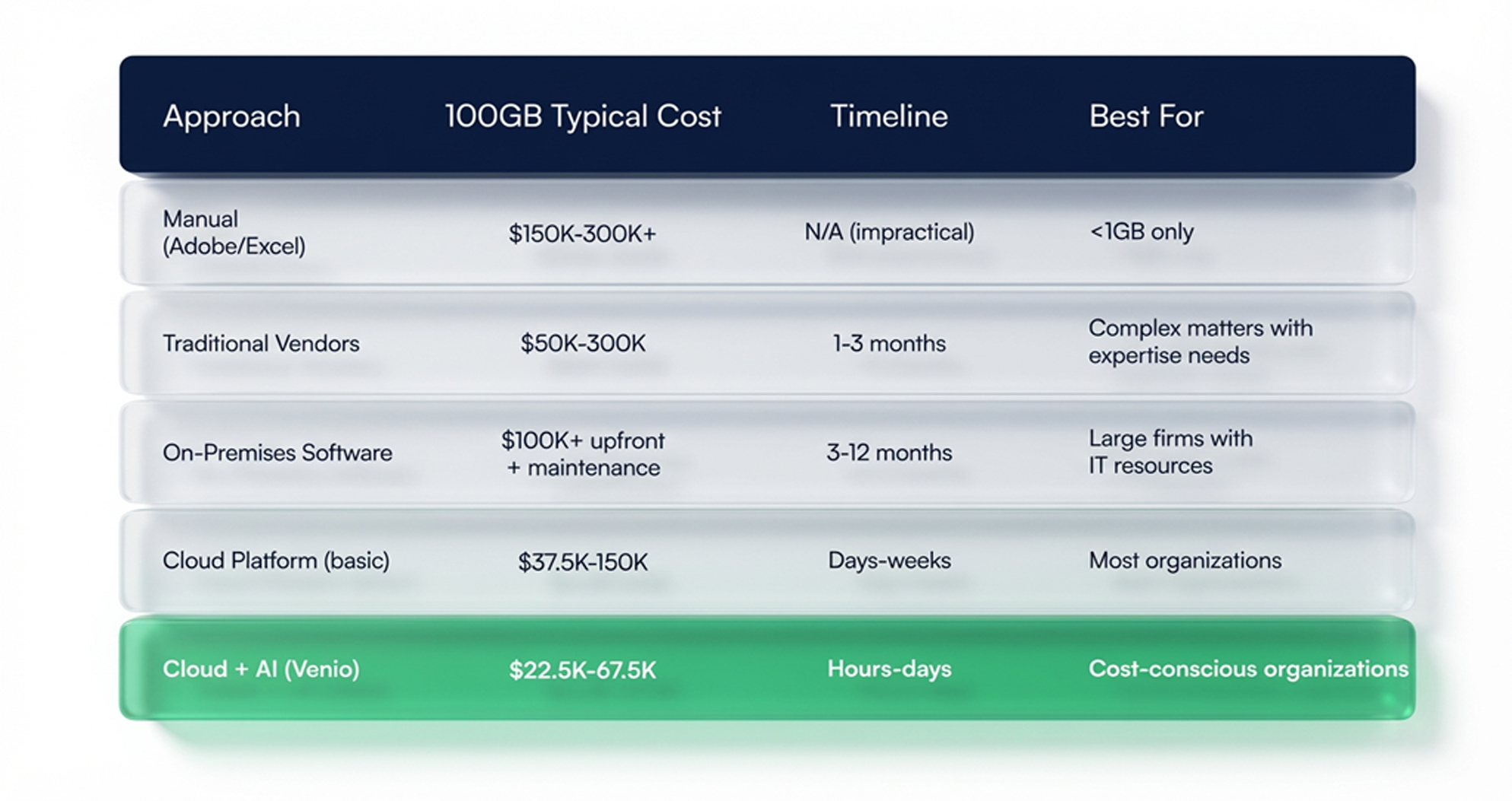
Real Impact: Intelligent platform selection can save $50K-$250K per matter. Firms handling 10+ matters annually can exceed $500K-$2.5M in annual savings.
Key eDiscovery Challenges
1. Explosive Data Volumes
2.5 exabytes created daily. Organizations store years of email, hundreds of Slack workspaces, thousands of Teams channels, and petabytes in cloud storage. Without effective filtering and automation, teams drown.
2. Variety of Data Sources
Evidence spans email, cloud tools (Slack, Teams, Google Workspace), video (Zoom, Teams), mobile messaging (WhatsApp, Signal), CRM/ERP systems, cloud storage, social media, IoT, and encrypted messaging. Each platform has different APIs, authentication, and retention policies.
3. Spoliation Risks
Accidental deletion, altered metadata, poor preservation, or failure to suspend normal deletion can trigger spoliation, resulting in:
- Monetary sanctions
- Adverse inference (the court assumes missing data was harmful to you)
- Case dismissal
- Malpractice liability
4. Cost and Time Pressure
Review costs 70-80% of eDiscovery software budgets. Teams must balance cost efficiency, accuracy, speed, and defensibility while meeting court deadlines.
5. Data Privacy and Security
GDPR, HIPAA, state privacy laws, and international regulations require sensitive information to be identified, redacted, secured, and tracked. Failure results in privacy fines (GDPR up to 4% of revenue), data breach liability, reputational damage, and sanctions.
6. Defensibility Requirements
Every action from identification to production must be documented and defensible. Judges scrutinize source identification, preservation methods, processing methodology, review consistency, metadata integrity, and process reproducibility. Gaps compromise cases.
7. Emerging Data Complexity
Slack threading, Teams recordings, encrypted messaging, and other novel sources lack established standards. Courts are still developing expectations. Handling these costs more than email, with uncertain outcomes.
eDiscovery Approaches: Choosing Your Path
1. Manual/Desktop Tools (Adobe, Excel, Outlook)
Collect data and review individually using standard software.
Advantages: Zero software cost, familiar tools, complete control
Disadvantages: Unscalable (10GB+ is overwhelming), no efficient search, cannot organize by metadata, high error rates, no duplicate detection
Cost: Approx~$300K+ (labor-intensive)
Best for: Only tiny matters (<1GB)
2. Third-Party Vendors (Traditional eDiscovery Services)
Organizations hire vendors to process, host, and manage document review.
Advantages: Deep expertise, handles complex projects, manages services reduce internal workload
Disadvantages: Expensive, slow (weeks-months), inflexible, hidden fees, loss of control, vendor lock-in
Cost: Higher side of costing
Timeline: 1-3+ months to go live
Best for: Complex, large matters where expertise justifies cost
3. On-Premises Software
Firms license and run software on local servers, managed by internal IT.
Advantages: Complete data control, no cloud residency concerns, potential profit center
Disadvantages: High upfront investment, significant maintenance, requires dedicated IT staff, difficult to scale, long implementation, many legacy solutions being sunset
Cost: Very High (capital expenditure + ongoing maintenance)
Timeline: 3-12+ months
Best for: Large firms with dedicated eDiscovery IT teams
4. Cloud-Based Software (Modern Platforms)
Access eDiscovery via a web browser. Data is processed, hosted, and reviewed in the cloud. Modern platforms use intelligent automation.
Advantages: Fast deployment (hours-days), predictable pricing, automated processing, intelligent culling, scales easily, 24/7 access, no IT involvement, AI/ML capabilities
Disadvantages: Cloud residency concerns, vendor-dependent, requires training
Cost: Low-Moderate ($1-5/GB + per-user)
Timeline: Hours to weeks
Best for: Most organizations
Evaluating eDiscovery Platforms: Essential Criteria
Data Processing
- Direct file upload without manual preparation?
- Processing speed? (Target: <1 minute per GB)
- Metadata preservation?
- Number of automated steps?
- Novel data type handling (Slack, Teams, etc.)?
Search & Review
- Intuitive, fast search?
- Organize by metadata (date, sender, recipient)?
- User-friendly review interface?
- Simultaneous multi-reviewer capability?
- Quality control tools?
- Privilege identification?
Legal Holds
- Easy creation and issuance?
- Compliance tracking and reminders?
- Multi-custodian/system support?
- Integration with email and collaboration platforms?
Early Case Assessment
- High-level data overview capability?
- Quick irrelevant document culling?
- Proportionality argument support?
- Early case valuation?
- Available analytics?
AI & Predictive Capabilities
- Predictive coding available?
- How does AI learn your decisions?
- Accuracy rates?
- User accessibility (non-technical)?
- Document clustering?
Production & Output
- Easy production creation?
- Format support (PDF, native, TIFF)?
- Customizable specifications?
- Automated Bates numbering?
- Inadvertent production prevention?
- Audit trail maintenance?
Security & Compliance
- Certifications (SOC 2, FedRAMP, ISO 27001)?
- FedRAMP for federal agencies?
- Uptime SLA?
- Encryption (in transit and at rest)?
- Audit logging?
- GDPR/HIPAA/SEC compliance?
- Disaster recovery?
Collaboration
- Legal, IT, outside counsel teamwork?
- Secure document sharing?
- Real-time annotation?
- Timeline and narrative building?
- Remote work support?
Support & Training
- Support included or extra?
- Response time?
- Training and onboarding?
- Knowledge base and community?
Pricing
- Transparent and predictable?
- What’s included vs. add-ons?
- Per-project minimums?
- Total cost of ownership?
Early Case Assessment: Accelerating Strategy and Reducing Costs
Early Case Assessment (ECA) is a rapid, high-level analysis of ESI to determine case value, scope, and strategy without conducting a full document review.
What is ECA?
Rather than reviewing every document, ECA teams analyze a statistically valid sample to understand:
- What evidence exists?
- What’s the best evidence for your case?
- What are the weaknesses?
- What’s the case worth or risk exposure?
- What will full discovery cost?
ECA Use Cases
Early in matters:
- During initial case evaluation (should we take this case?)
- Before responding to discovery requests
- Before committing to large budgets
- When determining proportionality arguments
During ongoing litigation:
- To assess settlement value
- To identify key evidence early
- To refine litigation strategy
- To adjust budget allocations
ECA Outcomes
Effective ECA delivers:
- Case valuation: What’s this worth? What’s our risk?
- Evidence summary: What key documents exist?
- Cost projection: What will full discovery cost?
- Risk assessment: What are the weaknesses?
- Strategy recommendations: Settle, proceed, or pivot?
- Proportionality analysis: Is full discovery proportional to value?
ECA Economics
Benefits include:
- Avoid unnecessary full discovery
- Settle early with better information
- Refine litigation strategy early
- Prevent bad case valuation decisions
- Reduce review volume through intelligent culling
ROI: Firms handling 10 matters/year with 50% ECA settlement rate save $250K-$1M+ through smarter decisions and avoided discovery costs.
How Venio Systems Supports the eDiscovery Cycle
While eDiscovery challenges are significant, they’re not insurmountable. With the right strategy, technology, and processes, legal teams transform obstacles into competitive advantages.
The Venio Advantage: AI-Powered, Unified Discovery
Venio Systems provides an all-in-one, AI-powered eDiscovery platform addressing the challenges outlined above:
1. Rapid Deployment & Accessibility
Rather than waiting weeks for vendor setup or months for on-premises installation:
- Same-day project creation (<1 minute)
- Direct data upload (drag-and-drop, no vendor coordination)
- Immediate processing (automated deduplication, OCR, indexing)
- Review start (~35 minutes from upload to first reviewable document)
This speed enables rapid ECA and eliminates timeline pressure.
2. Advanced AI & Predictive Technology
Built on AI at the core:
- Predictive coding: AI learns your review decisions and identifies similar documents, reducing review volume by 40-80%
- Privilege detection: AI identifies potentially privileged documents before review, preventing costly disclosure errors
- Clustering: Groups related documents for efficient review
- Early case assessment tools: Rapid data analysis for valuation and strategy
AI-powered review dramatically reduces the most expensive phase—manual document review.
3. Comprehensive Modern Data Handling
Supports data sources that challenge legacy platforms:
- Collaboration: Slack, Teams, Google Workspace with threading and context preservation
- Multimedia: Zoom recordings, Teams calls, audio/video with transcription and timestamping
- Mobile & Cloud: WhatsApp, Signal, OneDrive, Google Drive, Dropbox
- Databases: Enterprise systems with structured data
- Emerging sources: IoT, location data, wearables
4. Strong Information Governance & Legal Hold
Proactive data management reduces risk:
- Venio Legal Hold: Seamlessly issue, track, and manage holds across custodians and systems
- Automated compliance tracking: Ensure holds are acknowledged and maintained
- Defensible workflows: Transparent, auditable process from hold to waiver
- Risk reduction: Minimize spoliation exposure before litigation
5. Intelligent Data Reduction
Reduce volume at every stage:
- Smart processing: Efficient deduplication, OCR, and indexing reduce searchable documents
- Intelligent culling: Remove clearly non-responsive documents (spam, system files, obvious duplicates)
- Predictive coding: AI identifies responsive and privileged documents, further reducing manual review
- Result: 100GB might cull to 15GB, then AI-predict to 3-9GB, saving $50K-$150K in review costs
6. Flexible Deployment Options
Choose deployment that fits your needs:
- Venio Cloud: Scalable, pay-as-you-go, fully managed
- Venio On-Premise: Complete data control for security-sensitive organizations
- Venio Hybrid: Combine cloud scalability with on-premise security
7. Enterprise-Grade Security & Compliance
Meet the strictest requirements:
- SOC 2 & FedRAMP-ready: Trusted by federal agencies and Fortune 500 companies
- Encryption: In-transit and at-rest data protection
- Audit trails: Comprehensive logging for defensibility
- Compliance: GDPR, HIPAA, SEC, FINRA, and international standards
- Role-based access: Granular permissions for sensitive data
- Secure collaboration: Legal, IT, outside counsel work safely in same platform
8. Unified Platform, Unified Control
No silos, no integration headaches:
- Collection to production: Single platform for entire EDRM lifecycle
- Collaborative workflows: Legal, IT, and outside counsel coordinate seamlessly
- Complete visibility: Track every document, every decision, every step
- Defensible audit trail: Document justification for every action
- Reduced errors: Integrated QC prevents inadvertent production mistakes
9. Cost Control & Transparency
Predictable, all-inclusive pricing:
- No hidden fees: Processing, storage, and legal holds all included
- Per-GB simplicity: Clear, transparent pricing model
- ROI visibility: See cost savings from AI reduction and intelligent culling
- Flexible scaling: Grow or shrink usage as needed
- Cost comparison: Typically 60-80% cheaper than vendor approaches
Getting Started With eDiscovery
Venio Systems provides an all-in-one, AI-powered eDiscovery platform designed to solve the cost and complexity crisis.
- Speed: Go from data upload to review in minutes, not days.
- Unified: One login for Legal Hold, Processing, Review, and Production.
- AI-Powered: Native GenAI features to summarize documents and slash review times.
- Cost-Effective: Save 50-70% compared to traditional vendor models.
Don’t let complex data slow you down. Transform your eDiscovery process from a cost center into a competitive advantage.
Related Articles

4 Proven Ways to Control eDiscovery Costs in Any Legal Case
eDiscovery continues to rank among the top cost drivers for legal departments,
Read Article
Discovery Objections: A Comprehensive List and How to Succeed
During the discovery process, an attorney attempts to obtain
Read Article
Internal Investigations: Getting the Facts Without Blowing the Matter Open
An internal investigation offers no court schedule and no second chance at prese
Read Article